
Kitchen sections
Split the kitchen into sections — hot kitchen, grill, bar, pastry — and each sees only its own dishes.
Kitchen display · KOT
Every order goes straight from the till, the waiter and the QR menu to the kitchen screen. Each dish lands in its own section, shows how long it has waited, and tells the waiters the moment it is ready. Prefer paper? Print the kitchen order ticket too.
Free trial Works on any device Setup and training included
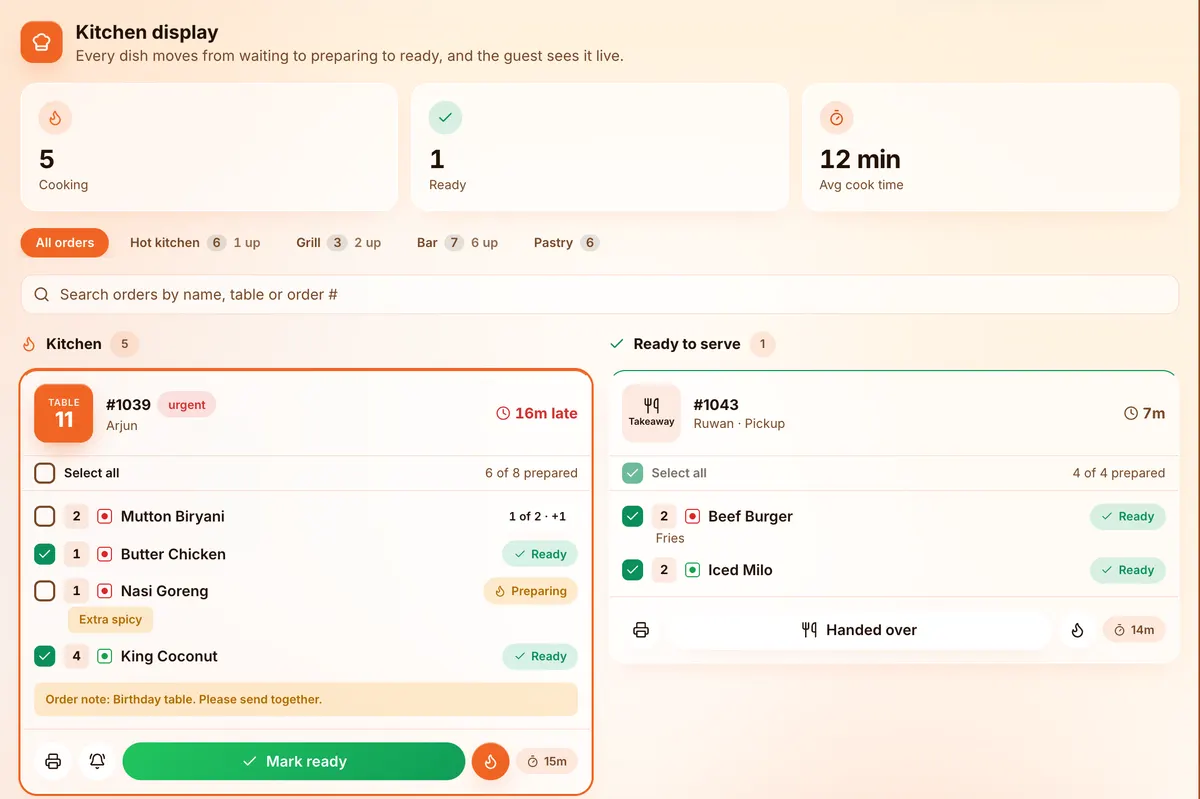
Split the kitchen into sections — hot kitchen, grill, bar, pastry — and each sees only its own dishes.
See what is late at a glance, with the average cooking time for the day.
Mark a dish ready and it appears on the waiter station; the guest sees it on their tracker.
Print the kitchen order ticket as well, if your kitchen likes paper.
Extra spicy, no onions, extra cheese — every note and add-on is on the ticket.
Make prepared items — sauces, pastes, dough — and take them out of stock properly.
From the till, the waiter app or the QR menu — no running to the kitchen.
Each section sees its dishes, with timers and notes.
Mark it ready and the waiter is told straight away.
The parts of DotMax behind this page, and the plan each comes with.
Every plan starts with a free trial.
For cafés and small restaurants
LKR 12,900 /month
or LKR 129,000 a year
For busy restaurants that want control of stock and repeat guests
LKR 24,900 /month
or LKR 249,000 a year
For groups and chains with two or more branches
LKR 31,900 /month
or LKR 319,000 a year · setup LKR 100,000
A KDS is a screen in the kitchen that shows orders instead of paper tickets. Cooks see what to make, how long each order has waited, and mark dishes ready for the waiters.
Yes. You can print the kitchen order ticket (KOT) as well as using the screen.
Any tablet, TV with a browser or computer screen. DotMax runs in the browser.
Yes. Split the kitchen into sections, choose which dishes go where, and each section sees only its own.
Book a free demo and we will set DotMax up with your dishes, your tables and your branches, so you can see exactly how it fits your restaurant.
Book a free demo